Create an ABAP Interpreter
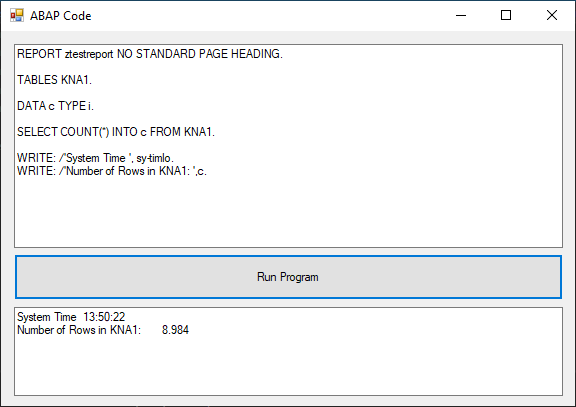
The following sample shows how to create a simple ABAP interpreter that executes a dynamic SQL statement.
Workflow
To create an ABAP interpreter:
- Connect to the SAP system using
R3Connection. - Add a new line of code to the dynamic report using
AddCodeLine. - Execute the report using
Execute. - Read the result set (regarding the ABAP list) using
GetResultLine.
Create an ABAP Interpreter
The following sample shows how to create a simple ABAP interpreter that executes a dynamic SQL statement.
| ABAP Interpreter |
|---|
| using System;
using ERPConnect;
using ERPConnect.Utils;
// Set your ERPConnect license
LIC.SetLic("xxxx");
// Open the connection to SAP
using var connection = new R3Connection(
host: "server.acme.org",
systemNumber: 00,
userName: "user",
password: "passwd",
language: "EN",
client: "001")
{
Protocol = ClientProtocol.NWRFC,
};
connection.Open();
const string code =
"""
REPORT ztestreport NO STANDARD PAGE HEADING.
TABLES kna1.
DATA c TYPE i.
SELECT COUNT(*) INTO c FROM kna1.
WRITE: /'System time ', sy-timlo.
WRITE: /'Number of rows in KNA1: ', c.
""";
var abapCode = new ABAPCode
{
Connection = connection
};
string[] lines = code.Split('\n');
foreach (string s in lines)
{
abapCode.AddCodeLine(s.Trim());
}
if (abapCode.Execute())
{
for (int i = 0; i < abapCode.ResultLineCount; i++)
{
Console.WriteLine(abapCode.GetResultLine(i));
}
}
else
{
Console.WriteLine($"ABAP Error: {abapCode.LastABAPSyntaxError}");
}
|
Output:
System time  11:17:46
Number of rows in KNA1:       7.705
Last update: June 5, 2024