Download Business Object Attachments
This sample shows how to download attached files from common business objects using the SAP tables SRGBTBREL and SOOD and the function module SO_DOCUMENT_READ_API1.
About
As of SAP rel. 4.6 users can attach documents to all common business objects, e.g., purchase orders:
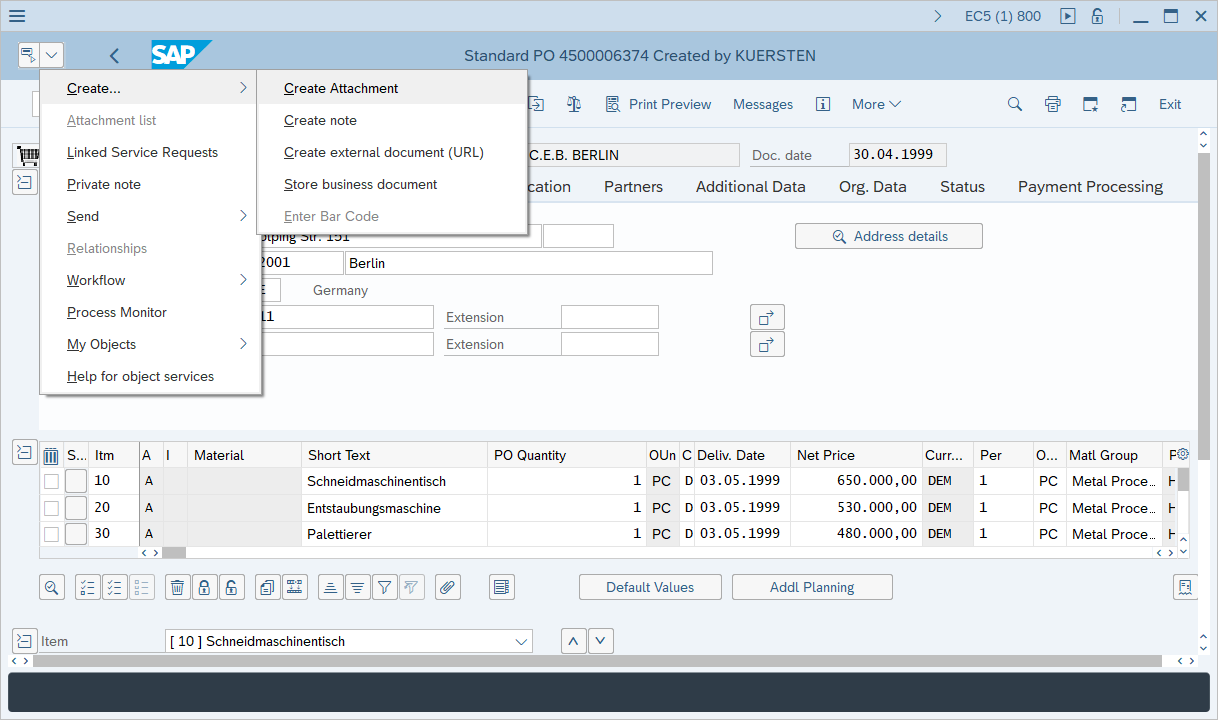
This sample uses the following workflow to download attachment files:
- Read the table SRGBTBREL to get all object IDs that are attached to business objects.
- Read the table SOOD to get the corresponding filenames and extensions of the object IDs.
- Use SO_DOCUMENT_READ_API1 to download an attachment with a given object ID.
Note
The function modules BDS_CONNECTIONS_GET and BDS_DOCUMENT_GET_TABLE can not be used in this scenario. Even if BDS_CONNECTIONS_GET delivers correct document IDs, the function module BDS_DOCUMENT_GET_TABLE throws an exception (NOTHING_FOUND).
Get a List of all SAP Attachments
Get a List of Object IDs
The following sample code reads the table SRGBTBREL to obtain all document IDs attached to a business object.
- The object key is the document number, e.g., the purchase number
- The object type is the name of the business object, e.g., BUS2012 for POs or BUS2010 for RFQs).
The function returns an array of strings each representing a key to a downloadable attachment.
| Table SRGBTBREL |
|---|
| public static string[] GetAllAttachmentKeys(R3Connection connection,
string ObjectType, string ObjectKey)
{
ReadTable read = new ReadTable(connection);
read.TableName = "SRGBTBREL";
read.AddField("INSTID_B");
read.AddCriteria("RELTYPE = 'ATTA'");
read.AddCriteria("AND INSTID_A = '" + ObjectKey + "'");
read.AddCriteria("AND TYPEID_A = '" + ObjectType + "'");
read.AddCriteria("AND CATID_A = 'BO'");
read.Run();
string[] DocIDs = new string[read.Result.Rows.Count];
for (int i = 0; i < read.Result.Rows.Count; i++)
{
DocIDs[i] = read.Result.Rows[i]["INSTID_B"].ToString();
}
return DocIDs;
}
|
Get a List of File Names
The following sample code reads the table SOOD to get the filename of each attachment.
- The primary key of the table entry is defined by parts of the document IDs provided by the function
GetAllAttachmentKeys above. - The filename of the attachment can be created by concatenating OBJDES and FILE_EXT.
| Table SOOD |
|---|
| public static string GetFileName(R3Connection connection, string DocID)
{
string OBJTP = DocID.Substring(17, 3);
string OBJYR = DocID.Substring(20, 2);
string OBJNO = DocID.Substring(22, 12);
ReadTable readsood = new ReadTable(connection);
readsood.TableName = "SOOD";
readsood.AddField("OBJDES");
readsood.AddField("FILE_EXT");
readsood.AddCriteria("OBJTP = '" + OBJTP + "'");
readsood.AddCriteria("AND OBJYR = '" + OBJYR + "'");
readsood.AddCriteria("AND OBJNO = '" + OBJNO + "'");
readsood.Run();
if (readsood.Result.Rows.Count == 0)
{
return "";
}
else
{
return readsood.Result.Rows[0]["OBJDES"].ToString() +
"." + readsood.Result.Rows[0]["FILE_EXT"].ToString();
}
}
|
Download SAP Attachment Files
The following sample code downloads an attachment with a given object ID using the function module SO_DOCUMENT_READ_API1.
- The returning structure DOCUMENT_DATA contains information about the file, e.g., DOC_SIZE.
- The table OBJECT_CONTENT returns the binary content of the attachment as a string.
- The strings are converted into byte arrays and stored to the disk.
| SO_DOCUMENT_READ_API1 |
|---|
| public static void DownloadDocument(R3Connection connection, string Path, string key)
{
RFCFunction func = connection.CreateFunction("SO_DOCUMENT_READ_API1");
func.Exports["DOCUMENT_ID"].ParamValue = key;
func.Execute();
Int32 len = Convert.ToInt32(func.Imports["DOCUMENT_DATA"].ToStructure()["DOC_SIZE"]);
string strfile = "";
System.Text.Encoding enc = System.Text.Encoding.GetEncoding(1252);
if (len > 0)
{
foreach (RFCStructure row in func.Tables["OBJECT_CONTENT"].Rows)
{
string stline = row["LINE"].ToString().PadRight(255);
if (len < 255)
stline = stline.Substring(0, len);
else
len = len - 255;
strfile += stline;
}
byte[] bytesfile = enc.GetBytes(strfile);
System.IO.File.WriteAllBytes(Path, bytesfile);
}
else
{
throw new Exception("Length of file = 0");
}
}
|
Read and Download Attachment Files
The following sample code queries a list of available attachments and downloads the attachments to the disk.
To download attachments of other business objects, change the object type, e.g., BUS2010 for RFQ.
| Read and Download Attachments |
|---|
| using System;
using ERPConnect;
// Set your ERPConnect license
LIC.SetLic("xxxx");
using var connection = new R3Connection(
host: "server.acme.org",
systemNumber: 00,
userName: "user",
password: "passwd",
language: "EN",
client: "001")
{
Protocol = ClientProtocol.NWRFC,
};
connection.Open();
string[] DocIDs = GetAllAttachmentKeys(connection, "BUS2012", "4500014561");
if (DocIDs.Length == 0)
Console.WriteLine("No attachments found");
else
{
for (int i=0; i < DocIDs.Length ;i++)
{
string FileName = GetFileName(connection, DocIDs[i]);
Console.WriteLine("Now downloading " + FileName);
DownloadDocument(connection, @"c:\" + FileName, DocIDs[i]);
}
}
Console.WriteLine("Press enter to exit");
Console.ReadLine();
|
Last update: July 3, 2026