Parameterization
This page shows how to parameterize the Xtract Hierarchy component using SSIS variables and Custom Properties.
Note
When closing the UI of the Xtract Hierarchy component using the [OK] button, any custom properties that are not SSIS variables may be overwritten with new values, e.g., when performing a new lookup.
Custom Properties of Xtract Hierarchy
The Custom Properties are properties unique to the component. They are displayed in the "Properties" window.
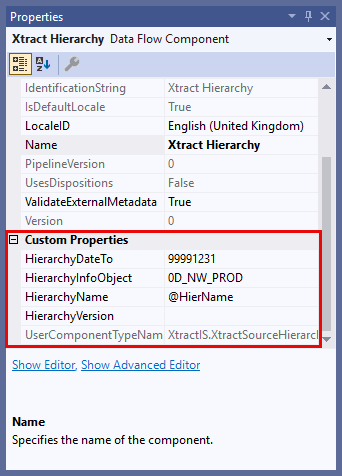
HierarchyDateTo
Specifies the key date up to which the hierarchy is valid. This property uses the SAP date format YYYYMMDD. The default value is 99991231 (December 31, 9999).
HierarchyInfoObject
Identifies the SAP BW InfoObject to which the hierarchy belongs, e.g., a cost center or profit center.
HierarchyName
Specifies the name of the hierarchy to extract. This is used to distinguish between multiple hierarchies that exist for the same InfoObject.
HierarchyVersion
Defines the version of the hierarchy to extract, e.g., active or modified versions. This allows the extraction of a specific hierarchy state when multiple versions are available.
Parameterization using SSIS Variables
SSIS variables store values that an SQL Server Integration Services package and its containers, tasks, and event handlers can use at runtime.
To use SSIS variables inside the Custom Properties of the Xtract Hierarchy component:
- Choose a Custom Property.
- Instead of entering a fixed value, enter a variable name with the prefix
@, e.g., @vDate. - Create a new SSIS variable with the same name, but without the
@prefix, e.g., vDate. - Select the data type string.
The SSIS variable is mapped to the Custom Property.