Licensing
This page contains information on Xtract IS licenses.
About the Licensing Concept of Xtract IS
The software is licensed under a subscription model. A fixed annual fee covers usage, updates, and support. The contract is renewed automatically unless terminated at least three months before the start of the next subscription period.
The annual subscription fee is based on the number of Windows servers on which SSIS packages are deployed and executed. This also applies to non-production environments such as test, development, and quality assurance systems.
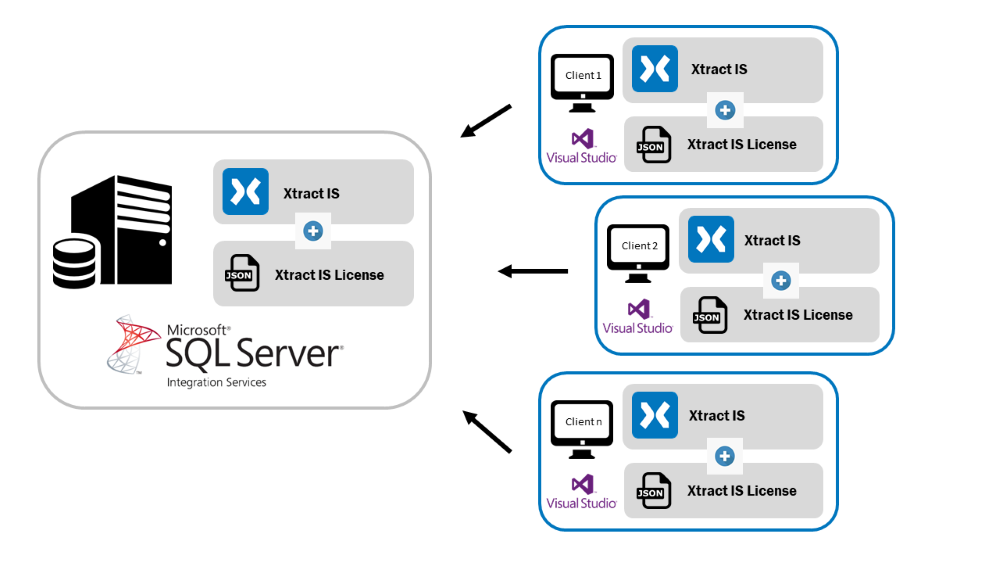
The license is bound to your company and a specific server name. The following graphic shows which workstations require a valid license. Local workstations can use the same license file for developing the SSIS packages.
Note
An unlimited number of SAP systems can be connected.
Install a License
A trial license is automatically installed with the installation of Xtract IS.
A regular license is provided in the customer portal - My Theobald Software after purchasing the product.
- Execute the
XtractLicenseManager.exefile in the installation directory of Xtract IS, e.g.,C:\Program Files\XtracIS.
The license manager opens.
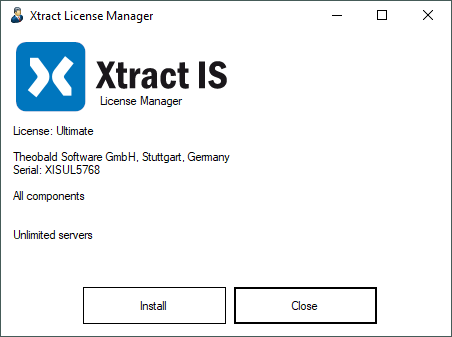
- Click [Install]. The window "Install Xtract License" opens.
- Locate and select the "XtractISLicense.json" file that is provided in the Customer Portal - My Theobald Software.
Tip
To inspect your current license data, click the Xtract IS Info link located in each component.
Move the License to a new Server
When moving your setup to a new server, a new license file must be issued for that server. Contact our sales team at customersuccess@theobald-software.com to let us know the name of the new server.