Parameterization
This page shows how to parameterize the Xtract Table component using SSIS variables directly in the Xtract component and by using SSIS expressions to set Data Flow Properties.
Parameterization using SSIS Variables
SSIS variables can be used to parameterize the WHERE Clause in the Xtract Table component, see Dynamic WHERE Clause with SSIS Variables.
Parameterization using Expression Properties
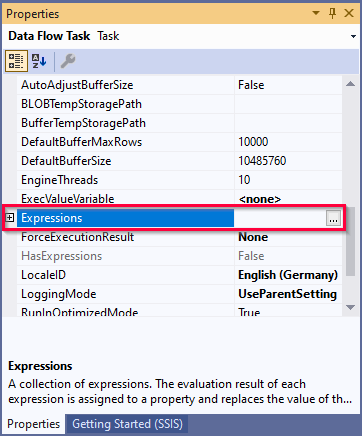
The recommended way of parameterization is to use SSIS expressions to set Data Flow Properties. Data Flow Properties are displayed in the "Properties" window of the Data Flow Task.
Note
Data Flow Properties are not to be confused with Custom Properties that are displayed in the "Properties" window of the component. When parameterizing the Data Flow Properties, the Custom Properties are overwritten.
For more information on property expressions, see Microsoft Documentation: Use Property Expressions in Packages.
To use expression porperties for parameterization:
- Right-click the Data Flow canvas and select Properties from the context menu. The window "Properties" opens.
- Add an Expression by clicking using […]. The window "Property Expression Editor" opens.
- Select a property from the drop-down list under Property.
- Open the "Expression Builder" using the […] button under Expression.
- Build your Expression and click [Evaluate Expression] to check for correct syntax.
- Confirm your input with [OK].
The property expression is configured and applied to the data flow task.
Data Flow Properties of Xtract Table
List of Data Flow Properties that can be parameterized:
| Property Name | Description |
|---|---|
| [Xtract Table].[WhereClause] | Corresponds to the tab WHERE clause in the Table component. Allows parameterization of the complete WHERE clause, see Knowledge Base Article: Dynamization of WHERE Conditions. |
| [Xtract Table].[ConvertsDates] | Enable or disable conversion of SAP dates, see ConvertsDates. |
| [Xtract Table].[CustomFunctionName] | Corresponds to the setting Function Module in the Xtract Table component. |
| [Xtract Table].[InvalidDateReplacement] | Every invalid value will be converted into the entered value, see InvalidDateReplacement. |
| [Xtract Table].[MaxRows] | Corresponds to the setting Row Limit in the Xtract Table component. |
| [Xtract Table].[MinDateReplacement] | Converts the SAP date 00000000 to the entered value, see MinDateReplacement. |
| [Xtract Table].[MaxDateReplacement] | Converts the SAP date 9999XXXX to the entered value, see MaxDateReplacement. |
| [Xtract Table].[PackageSize] | Corresponds to the setting Package Size in the Xtract Table component. |
Custom Properties of Xtract Table
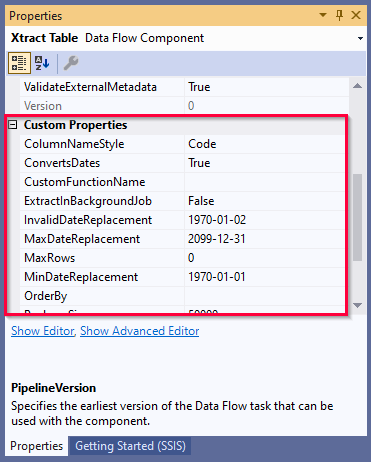
The Custom Properties are properties unique to the component. When parameterizing the component using SSIS variables, the Custom Properties are overwritten.
The Custom Properties of the Xtract Table component are displayed in the "Properties" window.
ColumnNameStyle
- Code: the SAP technical column name is used as column name in the output, e.g., MAKTX.
- PrefixedCode: the SAP technical column name is prefixed by SAP object name and the tilde character, e.g., MAKT~MAKTX.
- CodeAndText: the SAP technical column name and the SAP description separated by an underscore are used as column name in the output, e.g., MAKTX_Material Description (Short Text).
- TextAndCode: the SAP description and the SAP technical column name description separated by an underscore are used as column name in the destination e.g., Material Description (Short Text)_MAKTX.
ConvertsDates
When this property is set to True (default) SAP date fields (YYYYMMDD) assume the SSIS pipeline type DT_DBDATE instead of DT_WSTR. For the date conversions to apply, set the property UseLegacyDateConversion to False. In case of invalid data in SAP date fields, the following date conversions are applied:
- InvalidDateReplacement
- MaxDateReplacement
- MinDateReplacement
DateConversionMode
Ensures backward compatibility of date conversions in old Xtract IS versions. To use DateConversionMode, set the ConvertsDates property to True. DateConversionMode has the following options:
- Default: Uses the default date conversion as described in the ConvertsDates property.
- Legacy: Used for migrated components from Xtract IS versions after 5.0.0 and before 2025.9.17.15 to the current version.
- MapToCurrentDate: Used for migrated components from Xtract IS versions < 5.0.0 to the current version.
CustomFunctionName
Corresponds to the setting Function Module in the Xtract Table component.
ExtractInBackgroundJob
Corresponds to the setting Extract data in background job.
InvalidDateReplacement
Replaces an invalid date format. The default value is 1970-01-02. To use the property enter a replacement value for invalid SAP dates, such as '20190132' (January 32nd 2019) in the format yyyy-mm-dd. The value NULL is supported.
MaxDateReplacement
Replaces SAP dates with the year 9999. The default value is 2099-12-31. To use the property enter a replacement value in the format yyyy-mm-dd that contains the year ‘9999’. Example: ‘99990101’ (January 1st 9999). The value NULL is supported.
MinDateReplacement
Replaces SAP dates with the year 0000. The default value is 1970-01-01. To use the property enter a replacement value in the format yyyy-mm-dd that contains the year '0000'. Example: '00000000'. The value NULL is supported.
MaxRows
Corresponds to the setting Row Limit in the Xtract Table component.
OrderBy
Defines the table field that is used as the sort criterion for the result.
PackageSize
Corresponds to the setting Package Size in the Xtract Table component.
UseWideStrings
Defines whether DT_WSTR / DT_NTEXT (true) or DT_STR / DT_TEXT (false) is used as the data type for string columns.
WhereClause
Corresponds to the tab WHERE clause in the Xtract Table component. This property allows parameterization of the complete WHERE clause, see Knowledge Base Article: Dynamization of WHERE Conditions.|