Subscriptions
This page shows how to use the Xtract ODP(OData) component to track changes (deltas) in SAP data sources.
Subscribe to a Data Provider
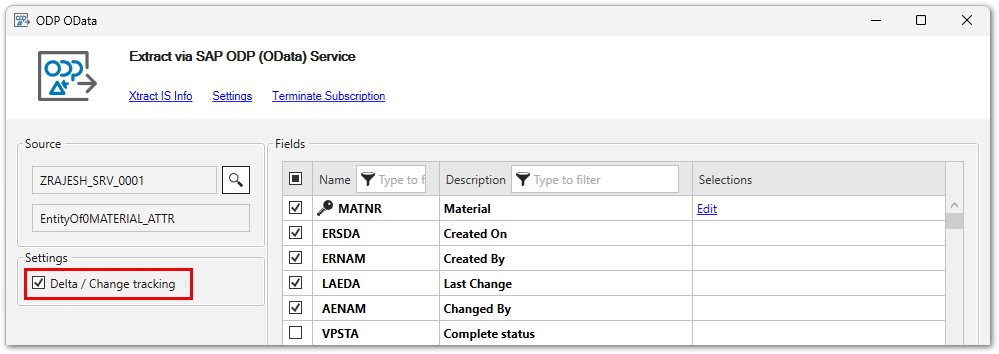
To initialize delta extractions, activate the checkbox Delta / Change tracking and run the SSIS package once. The first SSIS package run extracts all the data that matches the set selection criteria. After the initialization, the Xtract ODP(OData) component only extracts data that was added or changed on the SAP system since the last run.
Tip
Use SAP transaction ODQMON to display information about active subscribers in SAP.
Limitations
The following limitations apply to delta extractions:
- Delta loads are supported for:
- SAP DataSources
- CDS Views that use a specific setup method, see Knowledge Base Article: Create OData Services for CDS Views.
- Delta subscriptions are limited to one SAP user per service. To enable multiple delta subscriptions for a single user, the ODP framework must be exposed via multiple services.
Terminate Subscriptions
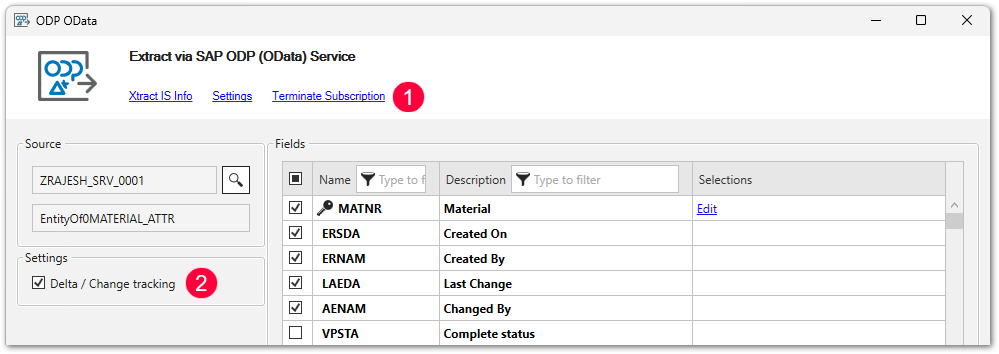
To terminate a subscription in Xtract IS, click [Terminate subscription] and deactivate the checkbox Delta / Change tracking .
Last update: June 24, 2026