Determine the Azure SSIS-IR Cluster ID
The following article shows how to access the Azure SSIS-IR Cluster ID. The Azure SSIS-IR ClusterID is needed to create a customer bound license. It is composed of the name of the Data Factory and the name of the Integration Runtime:
Azure SSIS-IR Cluster ID in the Azure Portal
To determine the Azure SSIS-IR Cluster ID:
- Login to your Azure Data Factory (ADF) account.
- Navigate to [Launch Studio] and select Configure SSIS. Data factory window opens .
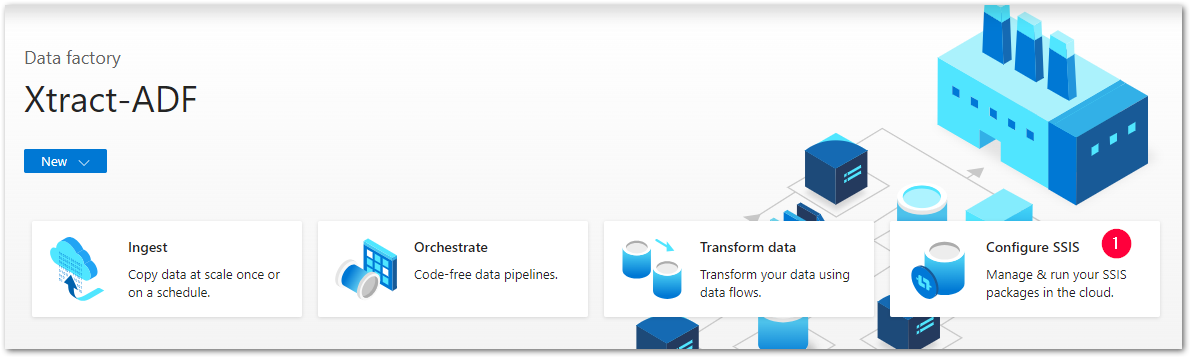
- Select your Data Factory, e.g., Xtract-ADF in the depicted example.
- In the general menu, select Integration Runtimes > [Name-of-the-IR], e.g., XTRACT-IR in the depicted example . The integration runtime window opens. A list of integration runtimes are displayed, including the type, the status and further information.
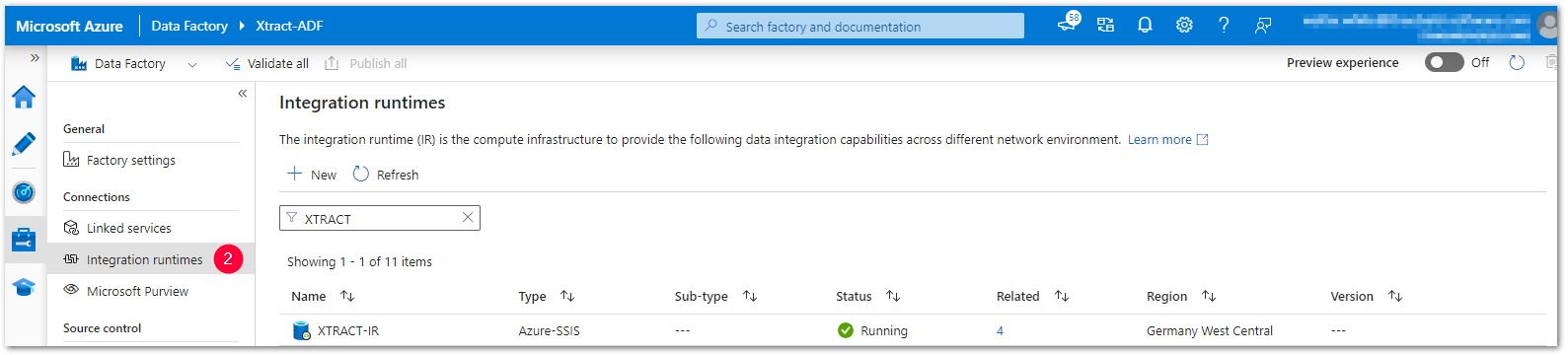
- Put together the Azure SSIS Cluster ID using the following syntax:
Microsoft.DataFactory/factories/[data factory name]/integrationruntimes/[integration runtime name]
The Azure SSIS-IR Cluster ID of the depicted example is:
Microsoft.DataFactory/factories/Xtract-ADF/integrationruntimes/XTRACT-IR
The Azure SSIS-IR Cluster ID is ready for licensing.
Related Topics
Last update: September 29, 2026