Dynamic WHERE Conditions
The following article shows how to define dynamic WHERE conditions for Table extractions.
The dynamization of the Xtract Table components increases the maintainability of SSIS packages. The depicted scenario uses SSIS expressions based on table properties for this functionality.
How to use [Xtract Table].[WhereClause]
To create a dynamic WHERE condition using the Xtract Table property [Xtract Table].[WhereClause]:
- Create an SSIS package and add an Xtract Table component.
- Look up the table you want to extract. The depicted example uses the SAP standard table BKPF - Accounting Document Header and the table field BUDAT - Posting Date in the Document.
- Right-click on the Data Flow canvas and open Properties.
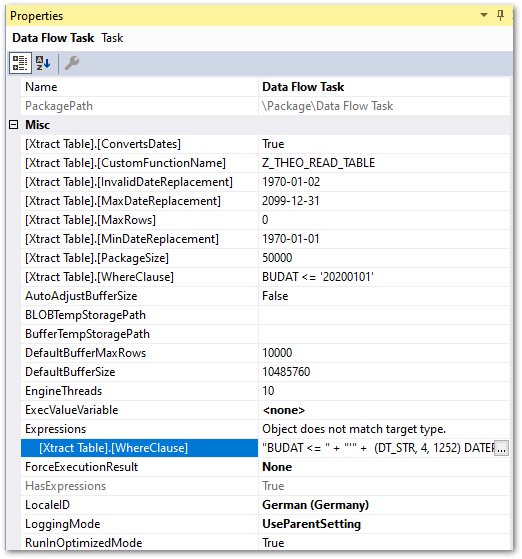
- Add an SSIS expression using the Expressions property. Click [...] next to the Expressions property. The window "Property Expressions Editor" opens.
- Select the property
[Xtract Table].[WhereClause].
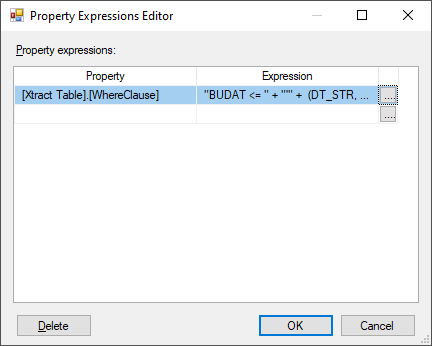
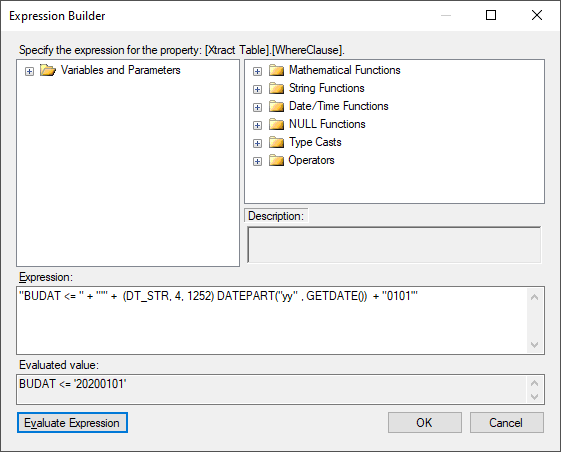
- Open the Expression Builder by clicking [...].
-
Enter an expression to create a dynamic WHERE clause. In the depicted example, only results until 01.01 of the current fiscal year are extracted:
-
Click [Evaluate Expression] to check if the syntax is correct.
- Click [OK] in the Expression Builder and the Property Expression Editor to confirm the input.
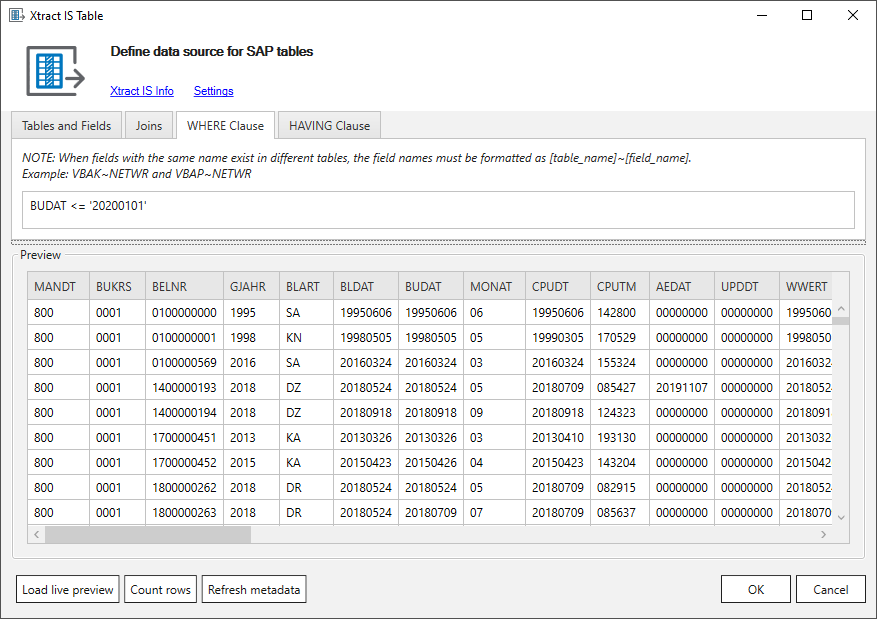
- Check the WHERE-Clause of the table extraction in tab WHERE Clause.
- Run the SSIS package.
Dynamic WHERE conditions are successfully applied to filter table extraction data.
SSIS Expression Samples
| SSIS Expression | Output | Description |
|---|---|---|
"BUDAT >= " + "'" + (DT_STR, 4, 1252) DATEPART( "yy", DATEADD( "yy", -1, GETDATE() ) ) + "%'" | BUDAT >= ‘2019%’ | All values of the last 2 years. |
"BUDAT = " + "'" +(DT_STR, 4, 1252) DATEPART("yy" , GETDATE()) + RIGHT("0" + (DT_STR, 2, 1252) DATEPART("mm" , GETDATE()), 2) +RIGHT("0" + (DT_STR, 2, 1252) DATEPART("dd" , GETDATE()), 2) + "'" | BUDAT = ‘20200726’ | All values of the current day. |
"BUDAT >= " + "'" + (DT_STR, 4, 1252) DATEPART( "yy", GETDATE() ) + "01%'" + " AND BUDAT < " + "'" + (DT_STR, 4, 1252) DATEPART( "yy", GETDATE() ) + "04%'" | BUDAT >= ‘202001%’ AND BUDAT < ‘202004%’ | All values in Q1 of the current year. |
"BUDAT LIKE " + "'" + (DT_STR, 4, 1252) DATEPART("yy" , GETDATE()) + RIGHT("0" + (DT_STR, 2, 1252) DATEPART("mm" , GETDATE()), 2) + "%'" | BUDAT LIKE ‘202007%’ | All values of the current month. |
"BUDAT LIKE " + "'" + (DT_STR, 4, 1252) DATEPART("yy" , GETDATE()) + "%'" | BUDAT LIKE ‘2020%’ | All values of the current year. |
(DT_WSTR, 4) YEAR( GETDATE() ) | 2022 | Current year value. |
(DT_WSTR, 4) DATEPART( "yy", DATEADD( "yy", -9, GETDATE() ) ) | 2013 | Annual calculation based on the number parameter used. |
Last update: June 9, 2026