MCP Server
The built-in MCP server of Xtract Universal.iQ enables SAP data integration with AI platforms that support the Model Context Protocol. It exposes Xtract Universal.iQ services as tools to AI clients. The MCP server can be used to create chatbots that query live SAP data or as part of agentic workflows that interact with SAP data.
How It Works
By using the Xtract Universal.iQ MCP endpoint, an AI agent can execute Xtract Universal.iQ web services to access real-time SAP data, such as customer master data or sales order information. This integration allows users to request and receive current SAP data in natural language while the system handles all connectivity and authorization tasks in the background.
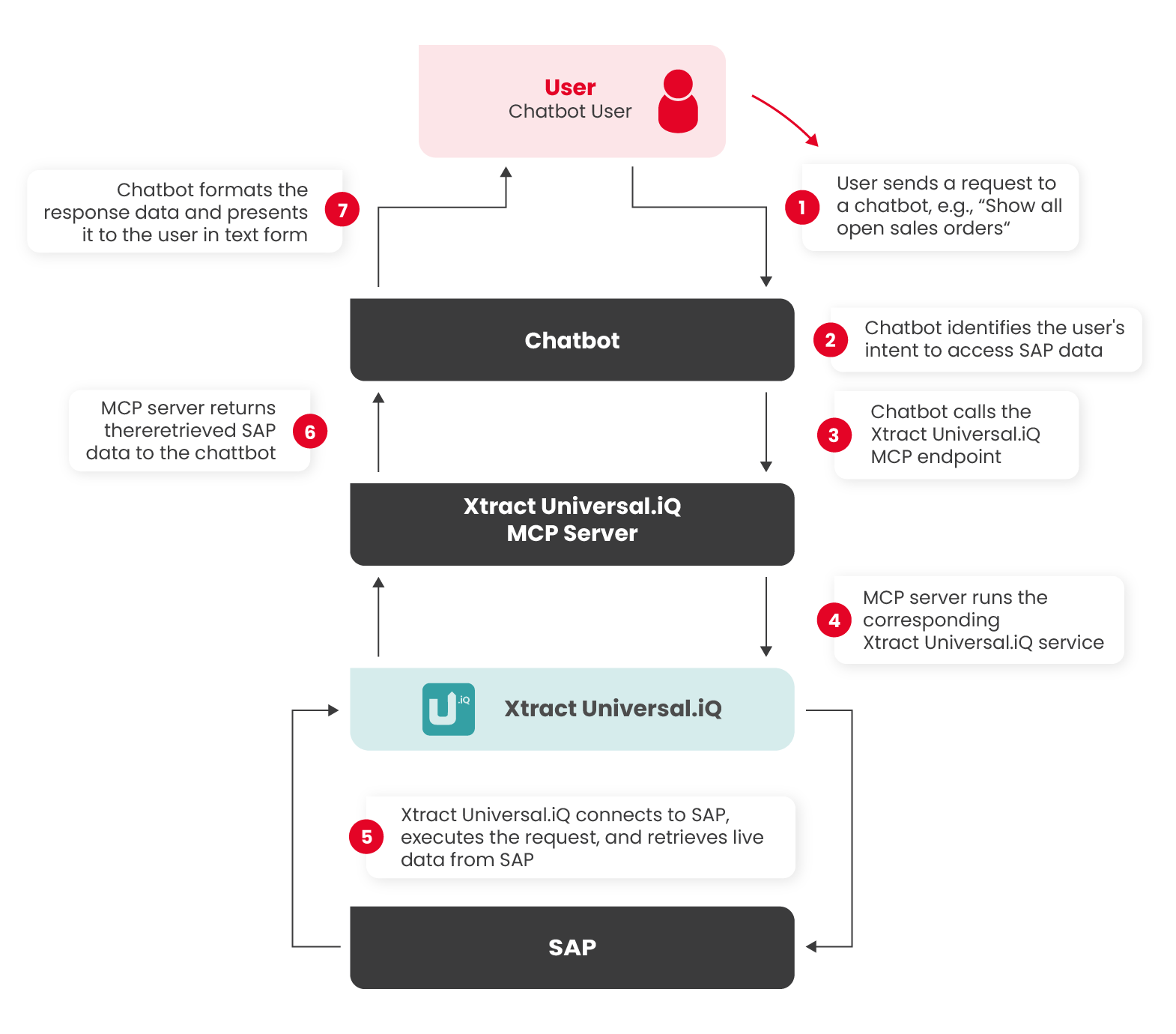
When an AI agent uses the Xtract Universal.iQ MCP endpoint, the following process applies:
- A user sends a request in natural language, e.g., “Show all open sales orders."
- The agent identifies the user's intent to access SAP data.
- The agent calls Xtract Universal.iQ's MCP endpoint at
https://<hostname>.com:8177/mcp. - The MCP server identifies and executes the corresponding service.
- Xtract Universal.iQ connects to SAP, executes the request, and retrieves live data.
- The MCP endpoint returns the retrieved SAP data to the agent.
- The agent formats the response data and presents it to the user in text form.
Chatbot Example
Activate MCP
To make Xtract Universal.iQ services accessible to AI platforms, the MCP endpoint of Xtract Universal.iQ must be exposed to the internet. To enable the MCP endpoint:
- Set up Transport Layer Security to ensure secured communication to the MCP server.
- Open the Settings menu and activate the checkbox Enable MCP Server endpoint in the Designer/MCP section.
- Open the MCP HTTPS port (default is 8177), e.g., using open port services.
Once the MCP endpoint at https://<hostname>.com:8177/mcp is accessible, you can configure your chatbot / AI agent to consume the MCP endpoint.
Expose Services via MCP
By default, not all Xtract Universal.iQ services are exposed via the MCP endpoint. Services have to be explicitly enabled for MCP:
- In the service settings, activate the checkbox MCP enabled. This option exposes the service to the Xtract Universal.iQ MCP server.
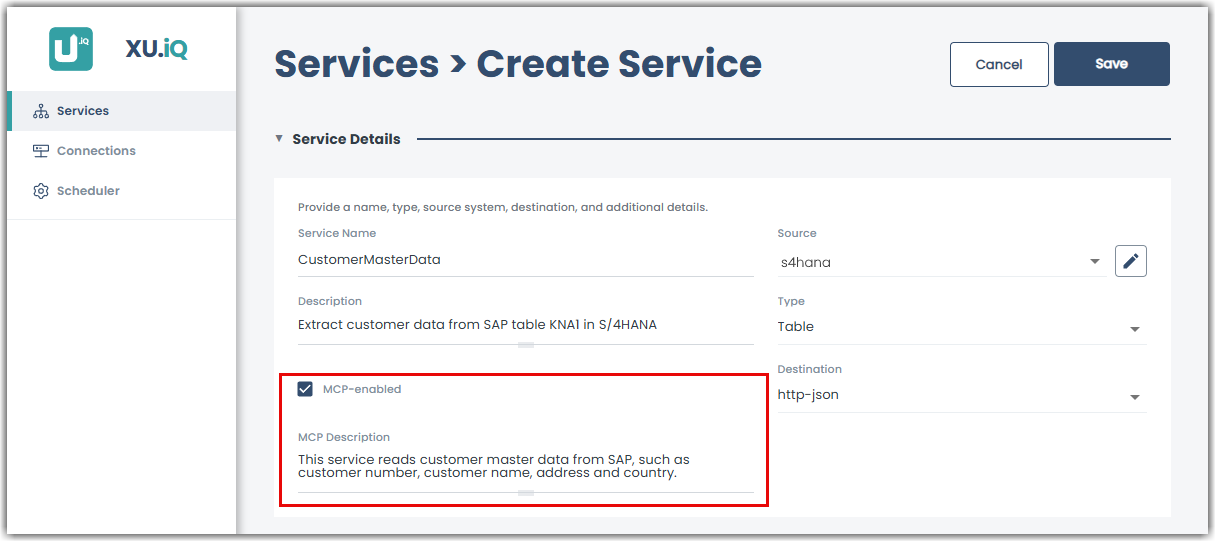
- MCP Description:
Provide clear and meaningful MCP descriptions when creating a service. The MCP server uses this description to match user intents to the correct service. A precise description improves recognition accuracy and response quality. - Parameter Naming:
Assign clear, self-explanatory names to all custom service parameters, e.g.,for input parameters in SAP transactions. Clear parameter names ensure consistent mapping between user input and service fields.
Integration Manuals
Refer to the following Knowledge Base Articles for step-by-step instructions on how to integrate the Xtract Universal.iQ MCP server with 3rd party AI platforms:




Common Use Cases
The following use cases provide SAP objects and their corresponding service types for getting started with MCP-powered SAP interactions.
Best Practices:
- Start with common business tasks.
- Expose only the MCP services the agent should call.
- In your prompt, keep service input clear so the AI can map user requests correctly.
Sales Assistants
Sales representatives spend a lot of time searching for information in SAP. An AI agent, embedded in tools like Microsoft Teams, can answer these queries in real time.
| Task | Xtract Universal.iQ Service Type | SAP Object |
|---|---|---|
| Check sales orders | Transaction | VA03 |
| Check inventory | Table | MARD |
| Get customer-specific pricing | Function Module / BAPI | BAPI_SALESORDER_GETDETAIL |
| Create purchase order | Function Module / BAPI | BAPI_PO_CREATE1 |
| Create purchase requisition | Function Module / BAPI | BAPI_PR_CREATE |
| Create incoming invoice | Function Module / BAPI | BAPI_INCOMINGINVOICE_CREATE1 |
Document Upload instead of Manual Data Entry
Upload a document to an AI agent to automatically extract and validate the relevant data. The Xtract Universal.iQ MCP server then transfers the data to SAP in the background, eliminating transfer errors.
| Task | Xtract Universal.iQ Service Type | SAP Object |
|---|---|---|
| Scan IDs to create a new employees in SAP | Transaction / Function Module / BAPI | PA40 / BAPI_EMPLOYEE_CREATE |
| Scan tax forms to create a new vendors in SAP | Transaction / Function Module / BAPI | BP / BAPI_VENDOR_CREATE |
| Upload invoices | Function Module / BAPI | BAPI_INCOMINGINVOICE_CREATE1 |
Maintenance and Inventory Management
Employees in warehouses or production can describe issues to an AI agent that identifies and triggers the appropriate SAP process.
| Task | Xtract Universal.iQ Service Type | SAP Object |
|---|---|---|
| Get inventory status | Table | MARD |
| Get product information | Table | MAKT, MARC |
| Create an inventory document for damaged goods | Function Module / BAPI | BAPI_MATPHYSINV_CREATE |
Controlled Customer Self Service
After authentication in a customer portal, the verified customer ID can be used for SAP queries in a customer chatbot. This setup in combination with exposing only relevant Xtract Universal.iQ services to the AI agent, ensures that the customer can only access a limited data set of their own data.
| Task | Xtract Universal.iQ Service Type | SAP Object |
|---|---|---|
| Request order status | Function Module / BAPI | BAPI_SALESORDER_GETSTATUS |
| Request invoice copies | Table | BKPF, BSEG |
| Check delivery dates | Function Module / BAPI | BAPI_OUTB_DELIVERY_GET_DETAIL |