Runtime Parameters
This page shows how to pass values to Xtract Universal.iQ service parameters at runtime.
For information on how to create user-defined custom parameters, refer to the documentation of the respective service type:
About Runtime Parameters
Depending on the HTTP method used to call a service, runtime parameters are either passed as:
- Query parameters in the service URL (HTTP GET). Add parameters at the end of the service URL, separated by '&'. They can be used for filtering or sorting.
- Body parameters in the request body of the service (HTTP POST). Body parameters add or update structured data, e.g., to pass tables to Function Module / BAPI services.
Pass Query Parameters
Query parameters are added to the service URL when calling a service using the HTTP GET method. They use the following format:
http://[host]:[port]/api/v1/services/[service name]?[parameter1]=[value]&[parameter2]=[value]
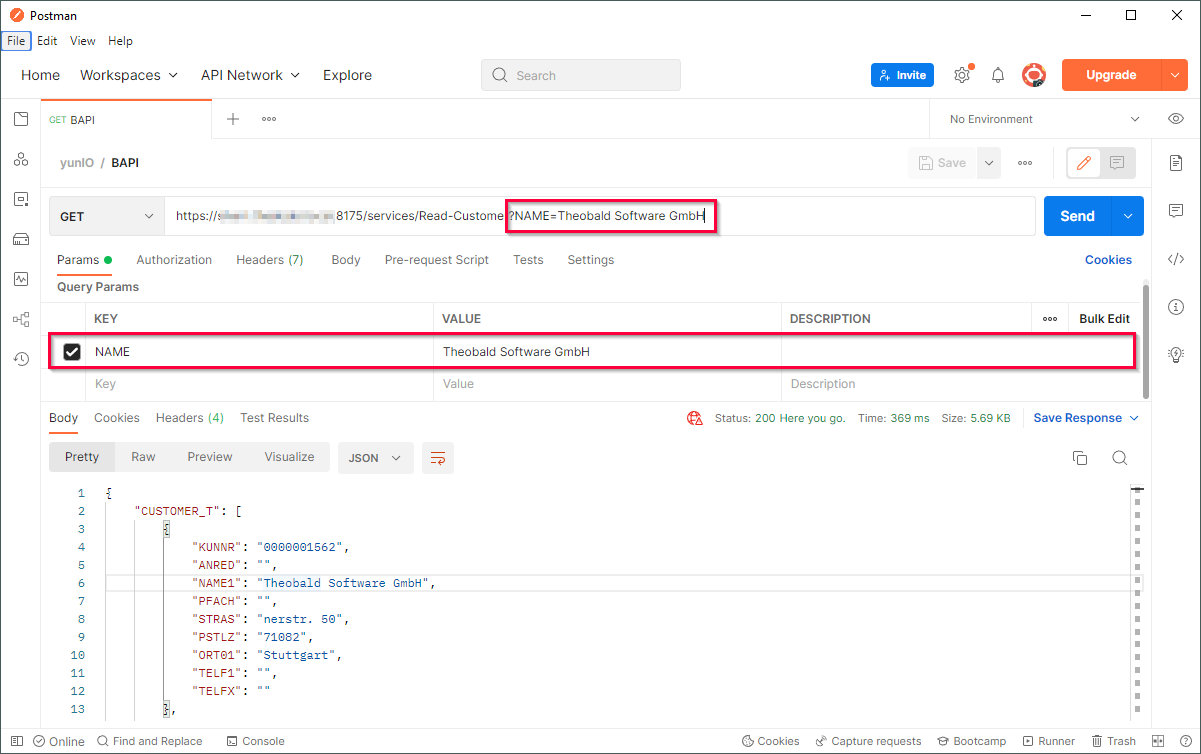
The sample in the screenshot below shows how to pass a value to the input parameter NAME using a query parameter in Postman.
Note
If URL parameters contain characters other than A–Z a–z 0–9 - _ . ! ~ * ' ( ) use an escape sequence for the characters. Some characters can break the URL, e.g., # % &.
To add query parameters to a service call:
- Open the Services menu.
- Select the service you want to parameterize and click [ Run > Service > Copy URL] to copy the service URL to your clipboard.
- Paste the copied URL into a browser or automation tool of your choice and add query parameters using the following syntax:
/?[parameter1]=[value]&[parameter2]=[value] - Once the parameter is defined, run the service.
The service runs with the defined parameters.
Pass Body Parameters
Body parameters are passed as a JSON object in the request body of a service using the HTTP POST method. They use the following format:
{
  "Parameter1": "string",
  "Parameter2": number,
  "Parameter3": [
    {
      "Nested_Parameter1": "string",
      "Nested_Parameter2": "string"
    }
  ],
  "Parameter4": [
    {
      "Nested_Parameter3": "string",
      "Nested_Parameter4": "string",
      "Nested_Parameter5": number
    }
  ]
}
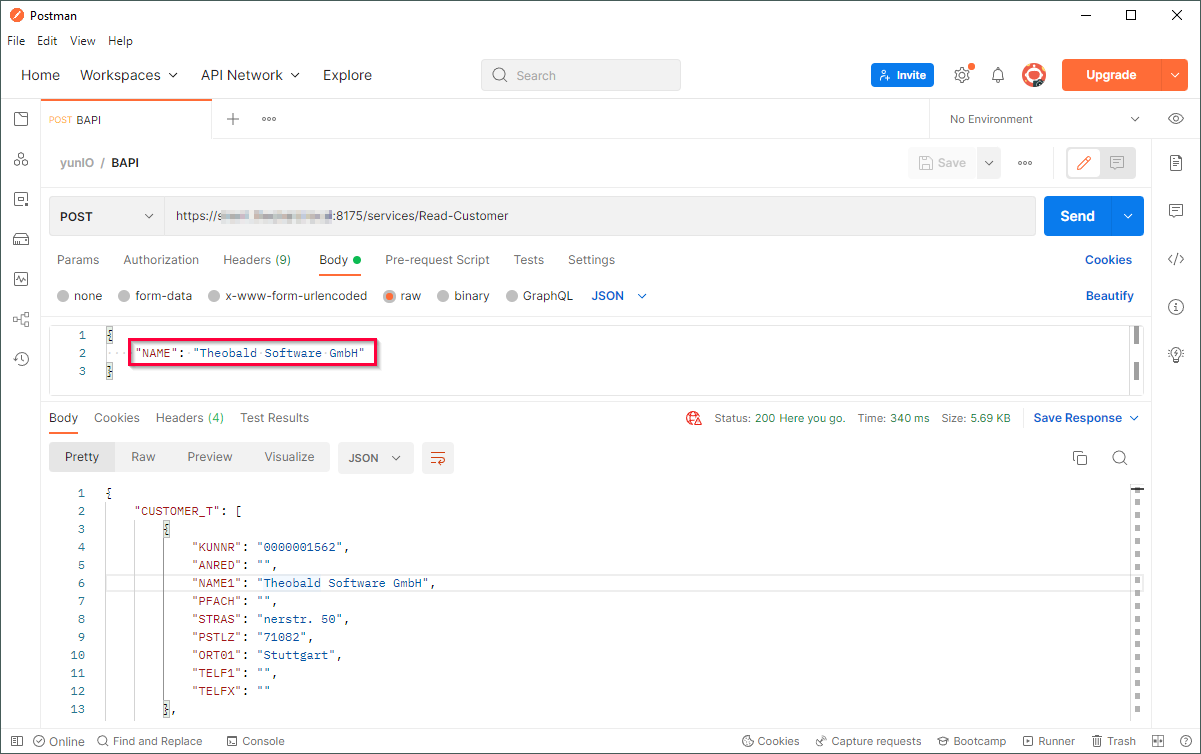
The sample in the screenshot below shows how to pass a value to the input parameter NAME using the request body in Postman.
To add body parameters to a request body:
- Open the Services menu.
- Select the service you want to parameterize and click Run > Service > Run. The "Run" menu opens.
- Optional: Enter values using the Input Parameters fields.
- In the Parameters section, click Save. The parameters are downloaded as a
[service name]_input_payload.jsonfile to your machine. - In the Service Details section, click to copy the service URL to your clipboard.
- Paste the copied URL into an automation tool of your choice.
- Open the
[service name]_input_payload.jsonfile and copy the content to your clipboard. - Paste the copied content into the request body of your service call in your automation tool.
- If your parameters do not have values yet, add values directly in the JSON body.
- Once all parameters are defined, run the service.
The service runs with the defined parameters.
Parameter Overview
Depending on the service type different parameters can be passed in the service URL to filter or sort data.
| Parameter | Description | Service Type | Example Service URL |
|---|---|---|---|
| [customParameter] | User-defined custom parameters, e.g., dynamic values inside a WHERE clauses or import parameters for BAPIs. | Function Module / BAPI ODP OData Table Transaction | http://example.com:8075/api/v1/services/[service name]/?customParameter=value |
| rows | Sets the maximum number of rows to be extracted | Table | http://example.com:8075/api/v1/services/[service name]/?rows=10 |
| packageSize | Sets the package size | Table | http://example.com:8075/api/v1/services/[service name]/?packageSize=1000 |
| whereClause | Sets a WHERE clause | Table | http://example.com:8075/api/v1/services/[service name]/?whereClause=LAND1 = 'DE' |
| variant | Name of a variant | Report | http://example.com:8075/api/v1/services/[service name]/?variant=VAR01 |
| skipPopups | Defines how to handle unexpected popup messages that show up at runtime. | Transaction | http://example.com:8075/api/v1/services/[service name]/?skipPopups=true |
Note
When defining a WHERE clause in an editor, make sure to use single quotation marks around values. The browser automatically replaces the spaces and converts the quotation marks.