Parameters
Parameters are placeholders for values that are either passed at runtime or added to the service output. Function Module / BAPI services can have up to four parameter types:
Import Parameters
Import parameters represent the input values sent from the client to SAP.
To pass values to import parameters, open the Import tab and select one of the following input types from the dropdown menu next to the parameter:
- Supplied by Caller: The item becomes available as a parameter in the request body of the service and can be set at runtime.
- Default (defined in SAP): The item uses the default values from SAP. This is the default setting.
- Constant: The item uses the value that is entered in the Value field.
Tip
To use tables as input parameters, see Table Parameters.
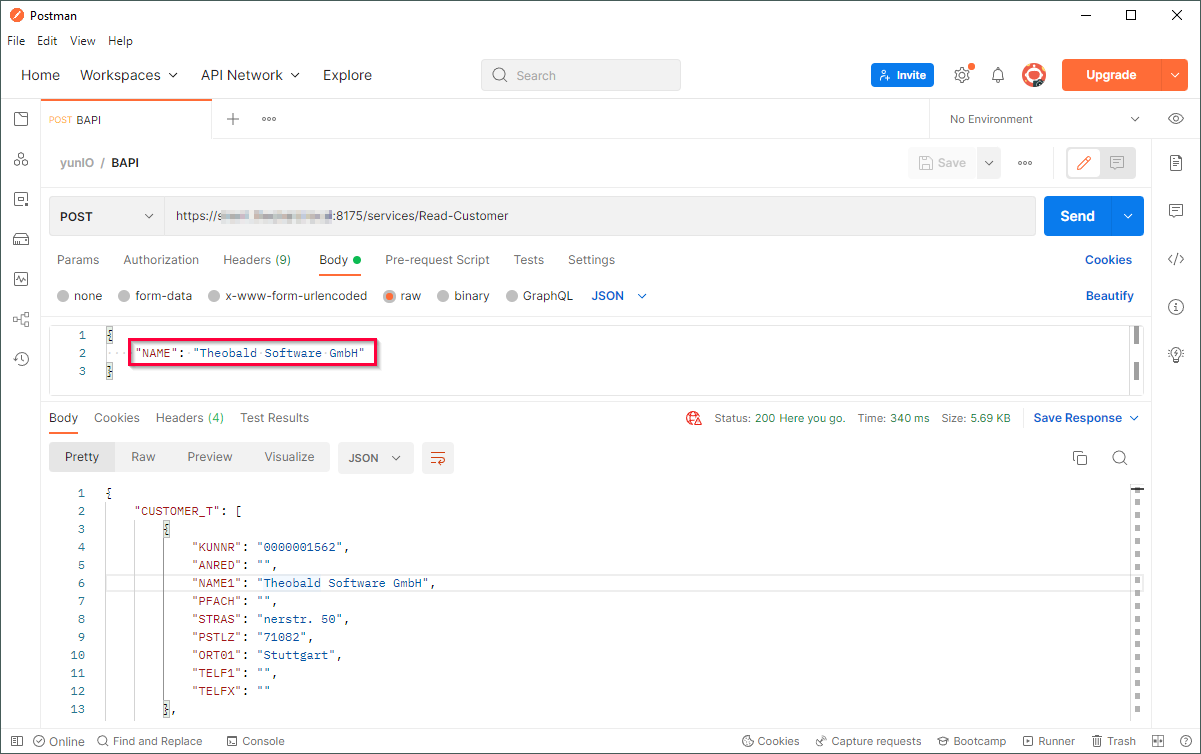
Import parameters set to Supplied by Caller can be populated at runtime using the request body of the service. The sample in the screenshot below shows how to pass a value to an input parameter NAME in the request body using Postman.
Note
When parameterizing the import parameters of the service, make sure the input matches the data type of the parameters.
Export Parameters
Export parameters represent the output values sent from SAP back to the client after the execution of a Function Module.
To add export parameters to the output of the service, open the Export tab and activate the checkbox next to the export parameters.
Tip
To use tables as output parameters, see Table Parameters.
Changing Parameters
Changing parameters represent parameters that can be used for input and output.
- To add changing parameters to the output of the service, open the Changing tab and activate the checkbox next to the parameters.
- To pass values to changing parameters, open the Changing tab and select an input type from the dropdown menu next to the parameter, see Import Parameters.
Table Parameters
Table parameters are parameters presented in a table structure consisting of multiple rows. Tables can be used to import or export data.
Tables as Input Parameters
To pass values to table parameters, open the Tables tab and select one of the following input types from the dropdown menu next to the table parameter:
- Supplied by Caller: The item becomes available as a parameter in the request body of the service and can be set at runtime.
- Default (defined in SAP): The item uses the default values from SAP. This is the default setting.
- Constant: The item uses the value that is entered in the Value field.
Tables as Output Parameters
To add table parameters to the output of the service, open the Tables tab and activate the checkbox next to the table parameters. Change the default name of the output parameter for better readability and data mapping when exposing the service via MCP.
Table parameters use the following naming format: [Table name].[column name].