Fields
This page contains descriptions of commonly used Fields and tabs in Entities. Which Fields are available in an Entity depends on the Template and the object type. Not all object types support all Fields.
Buildup
Entity
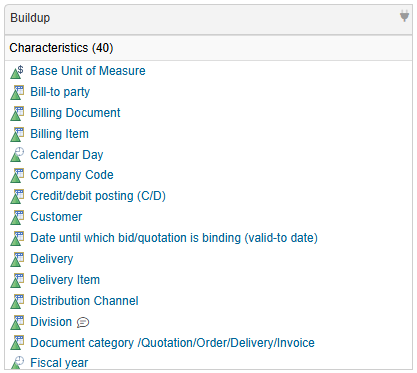
The Buildup Field shows the buildup of an object, e.g., a CDS View. The Buildup Field inside the tab can be customized in the Template by:
- selecting the object types it should contain
- grouping by object types
By default the Buildup contains:
- Characteristics
- Navigation Attributes
- Key Figures
For more detailed buildup information, see Detailed Buildup. Example of the Buildup Field in an Entity:
Data Origin
Entity Custom Entity
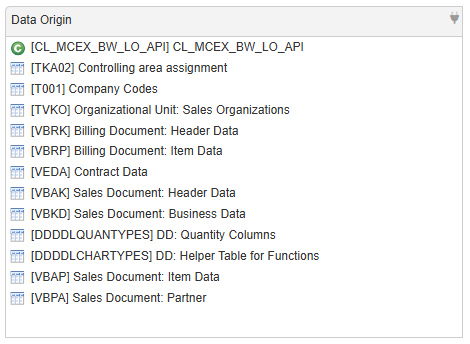
The Data Origin Field displays sources of Entities and Custom Entities. It provides a summarized view of the Object Lineage and shows the last node of the Object Lineage. The Data Origin is created automatically and can be extended with Custom Entities, see Stitching.
The following objects types support the Data Origin Field:
- SAP S/4HANA:
- CDS Views
- CDS View Entities
- Views
- Xtract Universal.iQ Designer:
- Services
Example of the Data Origin Field in an Entity:
Detailed Buildup
Entity
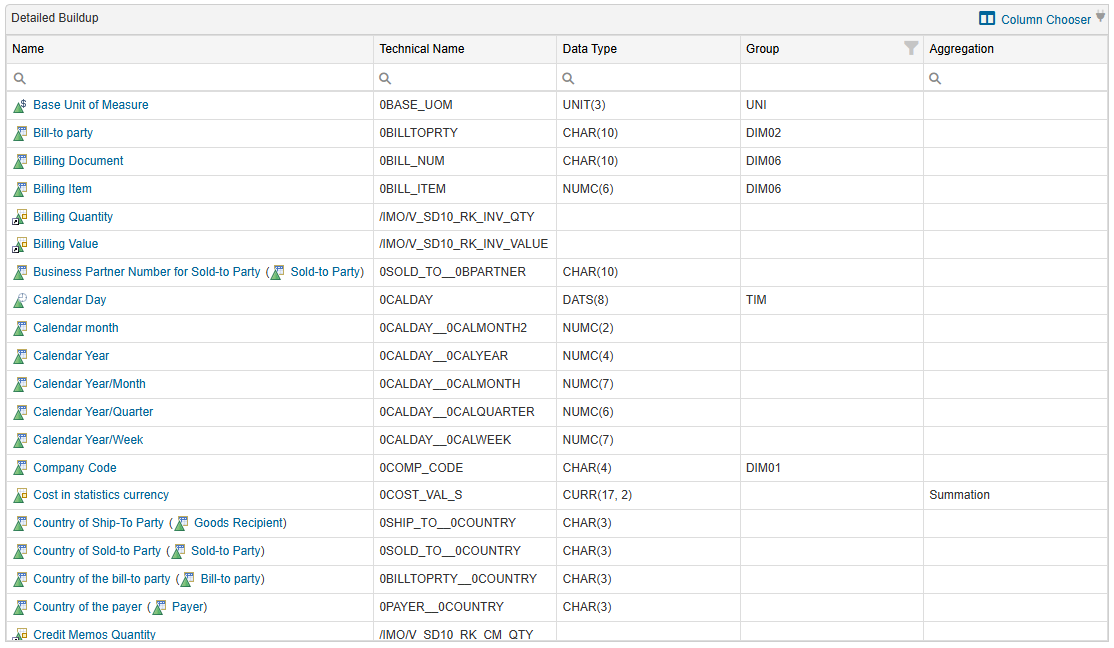
The Detailed Buildup Field shows the detailed buildup of an object, e.g., column names and data types in CDS Views. The tab can be added to the Template of an Entity. It cannot be customized, but it provides four additional columns that can be filtered:
- Technical Name
- Data Type
- Group
- Aggregation
Example of the Detailed Buildup Field in an Entity:
Tip
Columns can be removed into a Column Chooser.
Object Lineage
Entity Custom Entity
The Object Lineage tab displays a data flow that contains the data sources of an object. The Object Lineage is created automatically and can be extended with Custom Entities. You can use Custom Entities exclusively or stitch Entities together manually, see Stitching.
The following objects types support the Object Lineage feature:
- SAP S/4HANA:
- Views
- CDS Views
- CDS View Entities
- Xtract Universal.iQ Designer:
- Services
Note
If your Entity does not contain the Object Lineage tab, add the tab in the corresponding Template.
The data flow offers the following control options:
| Icon | Control | Description |
|---|---|---|
 | Switch to Drag Mode | Select and move elements in the data flow. |
 | Switch to Highligth Path Mode | Highlight connections of a selected node. When the connections of a selected node are highlighted, use mouse over to hightlight the connections of a second node and see overlapping connections. |
 | Switch to Vertical Mode | Change the display of the data flow to a vertical orientation. |
 | Switsch to Horizonatal Mode | Change the display of the data flow to a horizontal orientation. |
 | Expand View | Display the expanded view of the data flow. Expanding the view displays all elements and nodes between the start and end points, including the nodes that are summarized |
 | Compressed View | Display the compressed view of the data flow. In the compressed view, elements are summarized. Data model nodes for Microsoft Power BI, SAP Business Warehouse, and SAP S/4HANA summarize the nodes between the start and end points of the respective data model. This reduces the number of visible nodes so that only the start and end points are shown. |
 | Fit Diagram | Fit the data flow in the available space. |
 | Zoom In | Increase the zoom level. |
 | Reset Zoom | Return to the default zoom level. |
 | Zoom Out | Decrease the zoom level. |
 | Open Full Screen | Enter the fullscreen mode. |
 | Close Full Screen | Exit the fullscreen mode. |
 | - | Click and drag inside the canvas to pan the view. |
Note
The data flow displays nodes summaries by default. To view all elements between start and endpoints, click the Expand View icon button () inside the data flow.
Node Info Panel
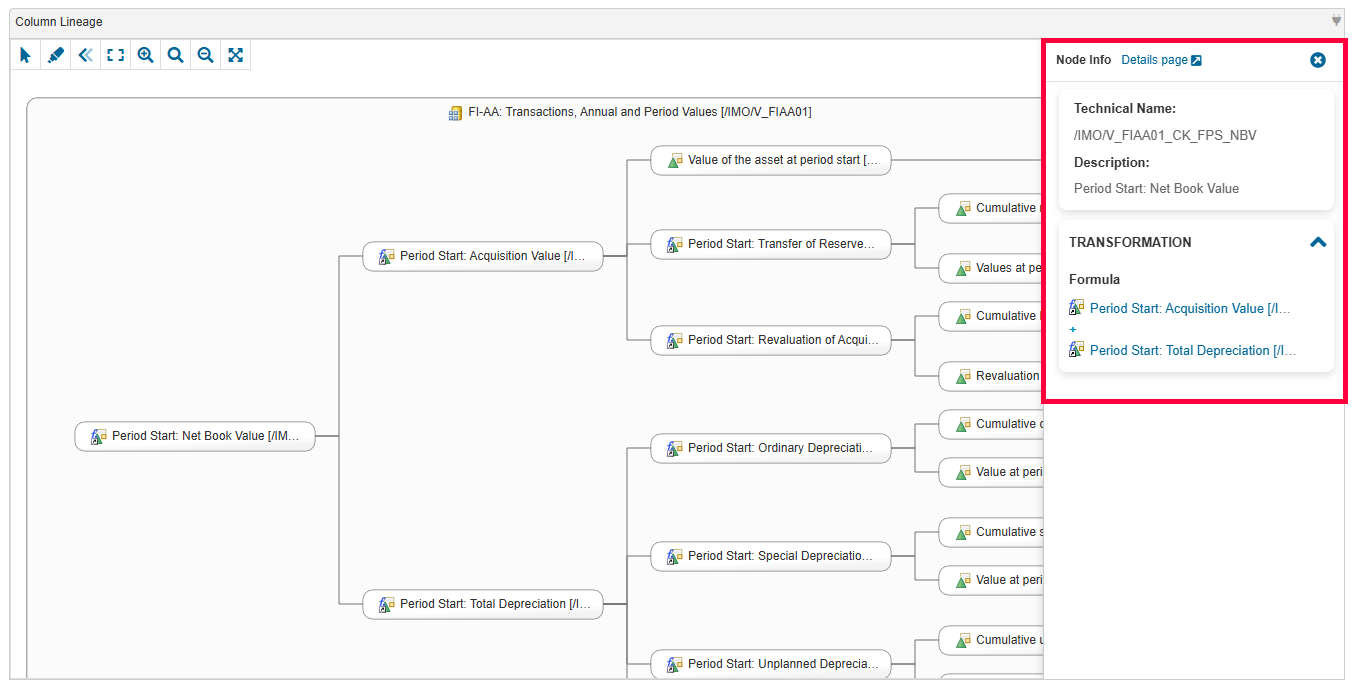
When selecting a node inside the Column Lineage data flow, a panel on the right side displays more details about the selected node. These information include:
- Link to the corresponding Entity's detail page, if available
- Technical Name
- Description
- Formula of Calculated Key Figures
- Definition of Restricted Key Figures
Quick Info
Entity
The Quick Info Field displays short descriptions or comments in Entities. For more information, see Edit Quick Info.
Where-Used
Entity
The Where-Used Field / tab provides an overview of which other Entities consume the current Entity, e.g., which Xtract Universal.iQ services consume a specific CDS View. The Where-Used Field can be customized in the Template by:
- adding object types.
- removing object types.
The following S/4HANA Entities objects types support the Where-Used feature:
 - not supported
 - supported
| Connected System | Used in ↓ / Entity → | View | Table | CDS View | CDS View Entity |
|---|---|---|---|---|---|
| SAP S/4HANA | View | | | | |
| SAP S/4HANA | CDS View | | | | |
| SAP S/4HANA | CDS View Entity | | | | |
| Xtract Universal.iQ Designer | Services | | | | |