Main Window Overview
This page gives an overview of the tiles in the Home screen of Enterprise Glossary. The layout of the Home screen can be customized in the User Profile.
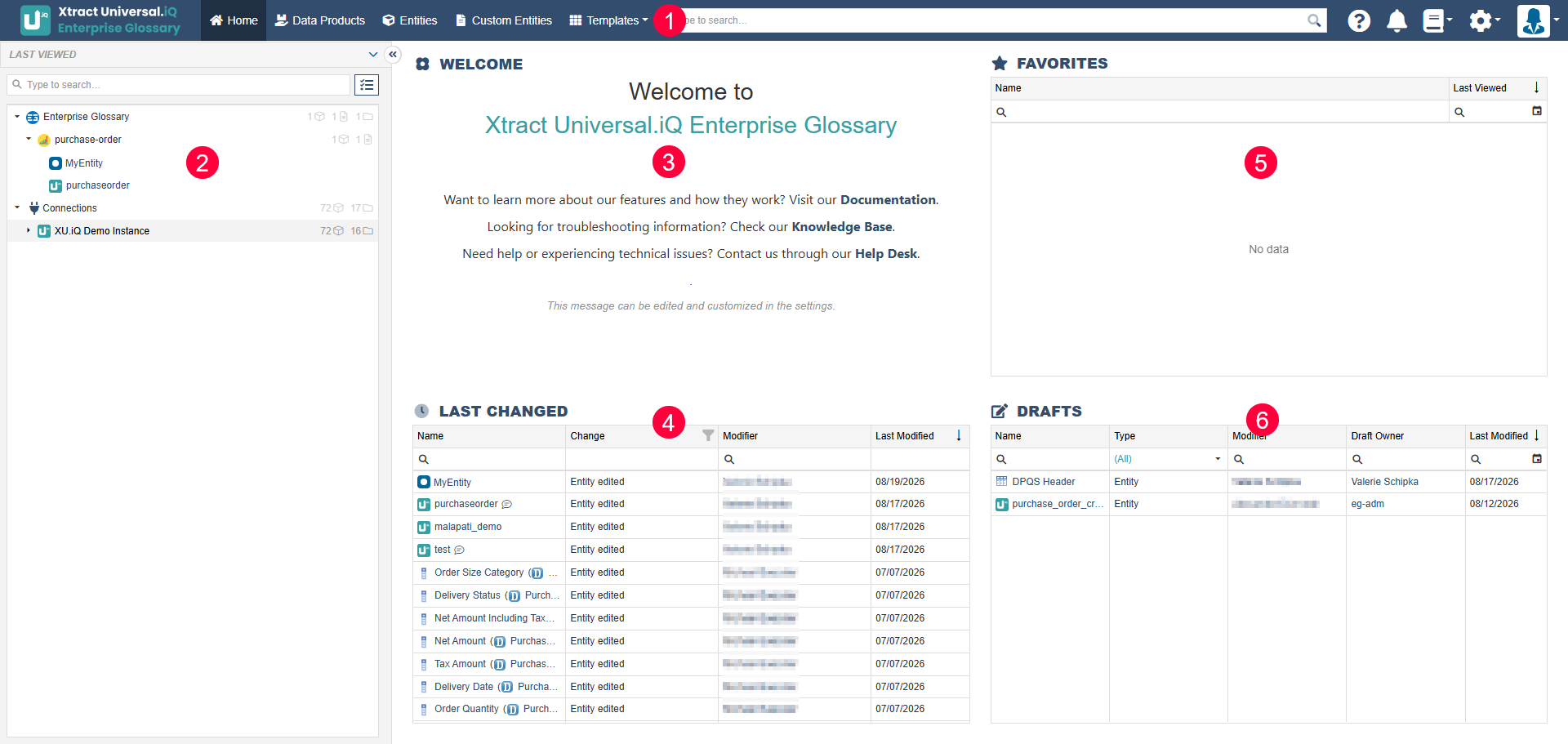
By default, the following areas are displayed in the Home menu:
| Sections | Content | |
|---|---|---|
| Main Navigation | Access to: • Customizable Home screen • Data Products • Entities • Custom Entities • Templates • Search bar (with advanced options for reusable search operations) • Link to the Enterprise Glossary documentation • Notifications • Abbreviation List • Settings • User Profile. | |
| Sidebar | Contains Last Viewed Entities and the folder structure, see Organize Entities in Folders. | |
| Welcome | Custom rich text; configurable by the administrator in the Settings. | |
| Last Changed | Entries that were changed recently, either manually or via synchronization. | |
| Favorites | Entries you marked as favorites. | |
| Drafts | Custom Entities or Entities (authors). |
Last update: September 4, 2026