Create OData Services for CDS Views
This article shows how to use the SAP Gateway Builder to create OData services that support delta loads from CDS Views. The services can be consumed by Xtract Universal's ODP(OData) extraction type.
About Delta Support for CDS Views
Xtract Universal supports delta loads from CDS Views using ODP(OData) extractions. Delta loads require an OData V2 service created with SAP transaction SEGW. The service must be based on an ODP data source extractor or a delta enabled CDS View. There are other ways to create OData services based on CDS Views, but none of them create the required delta entities.
Enable Delta Load for CDS Views
To support delta loads, the CDS View requires the following ABAP annotations:
@OData.publish: true@Analytics.dataExtraction.enabled: true@Analytics.dataExtraction.delta.changeDataCapture.automatic: true(delta fields for mapping must be defined manually if this annotation is missing)
The example code below shows how to use the annotations in CDS Views.
@AbapCatalog.viewEnhancementCategory: [#NONE]
@AccessControl.authorizationCheck: #NOT_REQUIRED
@EndUserText.label: 'Test CDS View'
@Metadata.ignorePropagatedAnnotations: true

" Ensure that the CDS View is found in the SAP OData V2 service catalog:
@OData.publish: true

" Enable delta loads:
@Analytics.dataExtraction.enabled: true

" Let SAP map delta fields automatically:
@Analytics.dataExtraction.delta.changeDataCapture.automatic: true

" The example below tracks changes from tables MARA and MAKT:
define view entity ZMATERIAL_TEST as
select from mara
left   outer to one join makt
on     mara.matnr = makt.matnr
{
    key mara.matnr as MaterialNumber,
    mara.ersda as DateOfCreation,
    mara.created_at_time as TimeOfCreation,
    mara.ernam as MaterialName,
    mara.laeda as ModifiedDate,

    @Semantics.quantity.unitOfMeasure: 'WeightUnit'
    mara.brgew as BruttoWeight,

    @Semantics.quantity.unitOfMeasure: 'WeightUnit'
    mara.ntgew as NettoWeight,

    mara.gewei as WeightUnit,
    makt.spras as DescriptionLanguage,
    makt.maktx as Description
}
Create OData Services for CDS Views
Follow the steps below to create an OData service that can be used to extract delta loads from CDS Views. The service can be consumed by Xtract Universal's ODP(OData) extraction type.
Note
This article focuses on SAP on-premise systems.
For information on how to create OData services in the SAP cloud, refer to SAP Help: Setting up Communication Management.
Prerequisites
- SAP NetWeaver Gateway Release 2.0 Support Package 4 or higher. In SAP S/4HANA, the Gateway is embedded, but needs to be activated.
- SAP user with access to the SAP Gateway Service Builder.
- To extract data using the BW InfoProvider (ODP context BW), an open hub license is required.
- Optional: to transport services from one SAP system to another, e.g., from a test environment to a production environment, authorization for CTS (Change and Transport System) is required.
Tip
To test services directly in SAP, activate the SAP Gateway Client via transaction /IWFND/GW_CLIENT.
Workflow
The creation of OData services can be divided into the following phases:
- Service Definition Phase:
Create a project to bundle all artifacts that are needed to develop a service. - Data Model Definition Phase:
Define the model that the service is based on, e.g., entity types, associations, etc.. - Service Implementation Phase:
Implement the operations that are supported by the service. - Service Maintenance Phase:
Register and activate the service in an SAP Gateway system.
Service Definition
To create a project that bundles all artifacts needed to develop a service:
- Log in to the SAP GUI.
- Go to transaction SEGW. The SAP Gateway Builder opens.
- Click Create Project ().
- Enter a name and description for the OData service.
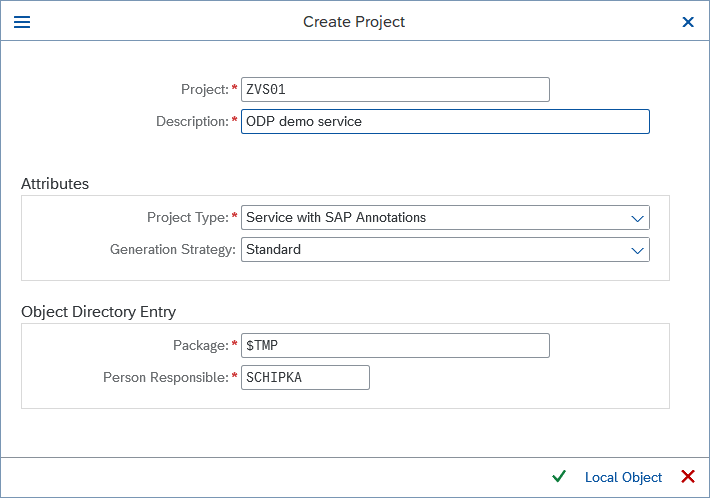
- In the field Project Type, select Service with SAP Annotations.
- If you want to transport the service to another SAP system, define a transport package.
Otherwise, enter $TMP (temporary objects). - Click Continue () to create the project.
The new project is listed in the main window of the SAP Gateway Builder.
Data Model Definition
To define the model the service is based on:
- In the main window of the SAP Gateway Builder, select your project and navigate to the DataModel directory of the project.
- Right-click the DataModel directory and select Redefine > ODP Extraction from the context menu.
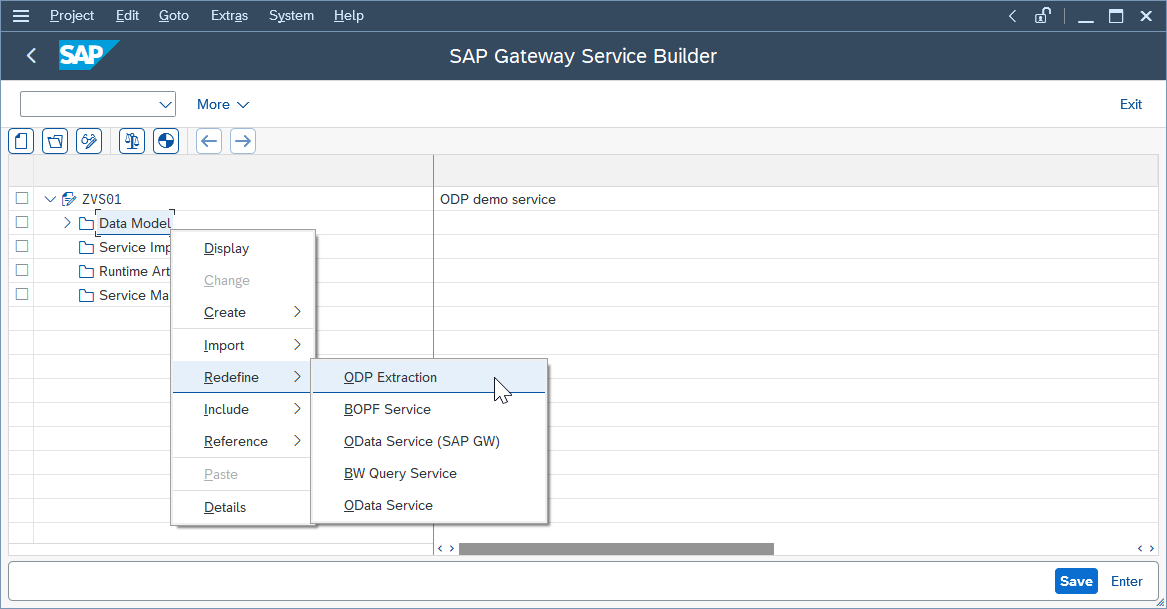
The window "Wizard step 1: OData access for Operational Data Provisioning" opens. - In the field ODP Context, select ABAP Core Data Services.
- In the field ODP Name, select your CDS View entity. The depicted example uses ZMATERIAL_TEST$E.
- Click [Add ODP] to add the CDS View to the data model.
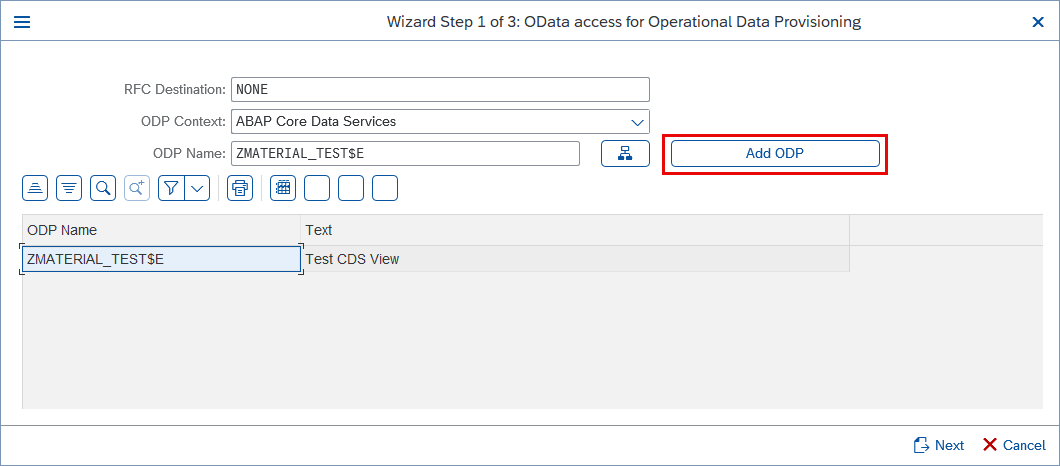
- Click Next to continue on to step 2 of the Wizard.
- Fill out any missing information and click Next. The window "Create Object Directory Entry" opens.
- If you want to transport the service to another SAP system, define a transport package. If not, click Save () to continue on to step 3 of the Wizard.
- Use the file tree menu to select the following entities and artifacts for the service:
- EntityOf defines the structure of your data. Select the fields you want to add to the service.
- DeltaLinksOfEntity contains delta links required to retrieve only changes (new, updated, or deleted records) instead of fetching the entire dataset. Select all items to activate delta updates.
- SubscribedToEntity checks whether a client is subscribed to delta changes. Select this artifact to activate delta updates.
- TerminateDeltasForEntity allows the client to stop tracking delta changes. Select this artifact to clean up unnecessary delta subscriptions.
- entityOf defines the relationship between entities in the OData service, e.g., it links the main entity (EntityOf) with its delta-tracking entity (DeltaLinksOfEntity).
- Click Finish ().
The subdirectories of the DataModel directory now contain the selected entities and artifacts.
Service Implementation
When using the Wizard during the Data Model Definition, the service implementation is auto-generated based on the underlying ODP framework.
The following use cases require manual adjustments:
- Modify how data is retrieved, e.g., to filter or transform the data before returning it to the client.
- Add custom business logic, e.g., to trigger additional actions when data is created/updated.
- Expose custom function imports, e.g., to execute a custom function.
Service Generation
Before the service can be activated, generate the runtime objects of the service:
- In the main window of the SAP Gateway Builder, select your project.
- Click Generate Runtime Objects ( ). The window "Model and Service Definition" opens.
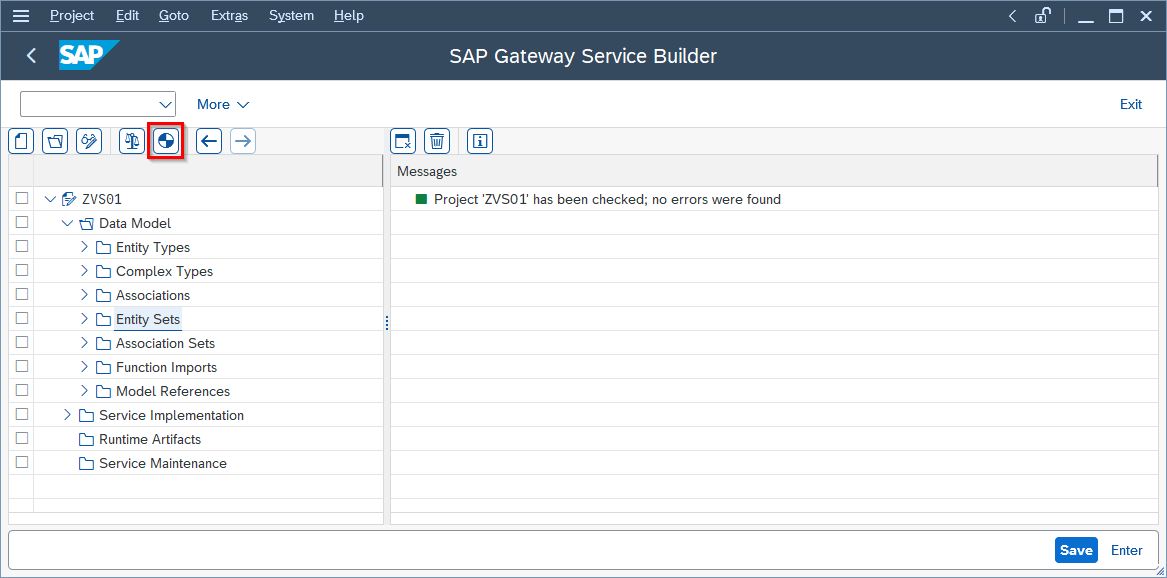
- Click Continue (). The window "Create Object Directory Entry" opens.
- If you want to transport the service to another SAP system, define a transport package. If not, click Save ().
The runtime objects for the service are now generated.
Service Maintenance
To register and activate the service:
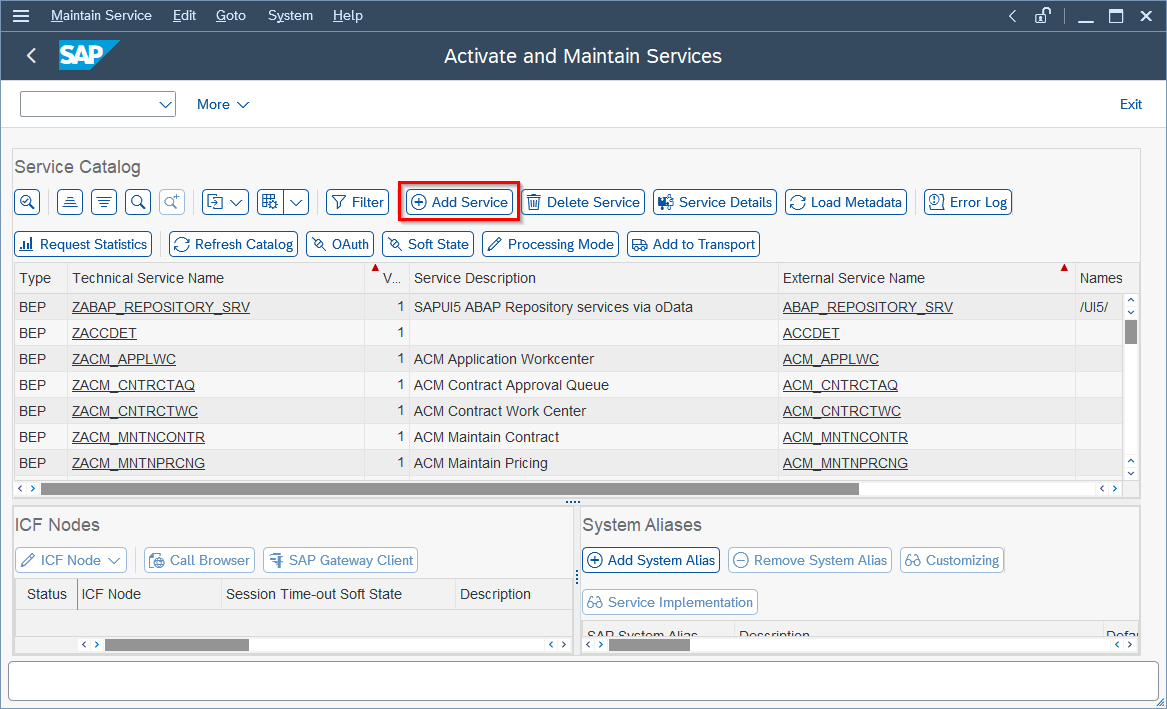
- Go to transaction /n/IWFND/MAINT_SERVICE. The "Activate and Maintain Services" menu opens.
- Click Add Service. The menu "Add Selected Services" opens.
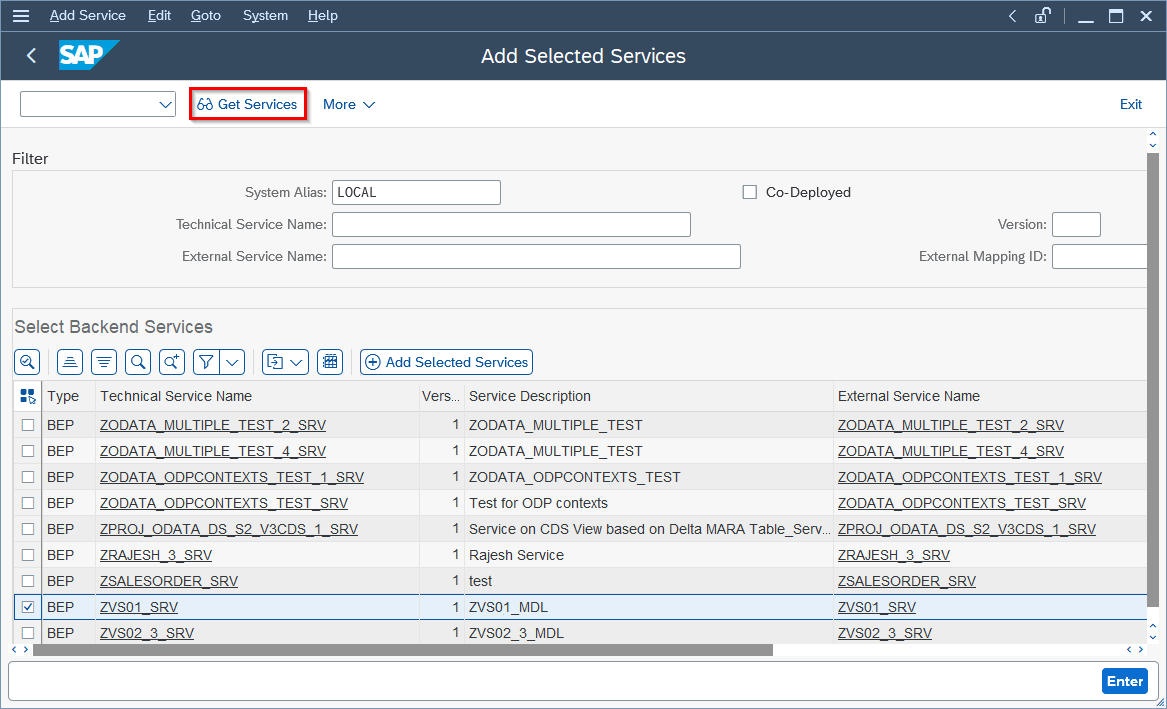
- In the field System Alias, select LOCAL.
- Click Get Services to display a list of all services on your SAP system.
-
Select the service you want to register.
Tip
Use Find () to look up the service.
-
Click Add Selected Services. The window "Add Service" opens.
- Check the service information and click Continue (). The window "Add Service" closes.
- Exit the "Add Selected Services" menu and check if the service is now listed in the service catalog.
The service can now be consumed by OData extractions.
Note
When initializing the CDC process using the ODP(OData) extraction type, the entire CDS View is extracted. You cannot initialize the CDC process without a full load. After the initial load, delta loads work as expected and only changes (new, updated, or deleted records) are extracted.
Related Links
- Knowledge Base Article: Create OData Services using the SAP Gateway Builder
- SAP Documentation: Publishing CDS Views as SAP Gateway Services
- SAP Help: SAP Gateway Service Builder
- SAP Learning: Building OData Services with SAP Gateway
- SAP Help: ODP-Based Data Extraction via OData
Last update: May 11, 2026
Written by: Valerie Schipka, Thiago Destro