ODP Restriction Opt-Out until EOY 2026
This article shows how to temporarily opt out of SAP's ODP API restrictions if you are affected by the SAP security update that blocks unauthorized ODP-RFC calls.
Note
The opt-out does not change SAP's security rules or permitted usage of ODP-RFC. It expires at the end of 2026.
About Opting Out
After the installion of SAP security note 3748819, SAP blocks unauthorized ODP‑RFC calls. As a result, extractions that use the ODP extraction type return the following error message:
Unknown caller; Call rejected. See SAP Note 3635619
Blocking unauthorized ODP-RFC calls is part of SAP's security strategy to protect customers from unauthorized access to ODP-RFC interfaces. To prevent operational disruptions after applying the security update, SAP provides a temporary exception (opt-out) using Report RODPS_REPL_SECUREACCESS_OPTOUT. It allows unauthorized ODP-RFC calls to continue at the customer's own risk.
The opt-out is valid until the end of 2026. After expiration, SAP will release another note that re‑enforces the ODP API restrictions with no further opt‑out, see SAP Note 3731818.
Additional Resources
The following SAP Notes provide information about the ODP API restrictions:
- SAP Note 3255746 – Provides general information about the SAP ODP policy.
- SAP Note 3439624 – Helps identify unpermitted ODP‑RFC calls.
- SAP Note 3748819 – Introduces a security update that blocks unauthorized ODP‑RFC access.
- SAP Note 3731818 – Provides guidance and fixes to temporarily opt out ODP restrictions.
For information about Xtract Universal's alternatives for ODP, see Knowledge Base Article: Alternatives for the ODP Extraction Type.
Opt Out until EOY 2026
To opt out of the ODP API restrictions until the end of 2026:
- Open the SAP GUI and log in to the source system.
- Go to SAP Transaction SE38. The ABAP editor opens.
- Enter the Program name
RODPS_REPL_SECUREACCESS_OPTOUTand click [Execute] (F8). - Activate the checkbox Opt-out of Secure ODP API Access.
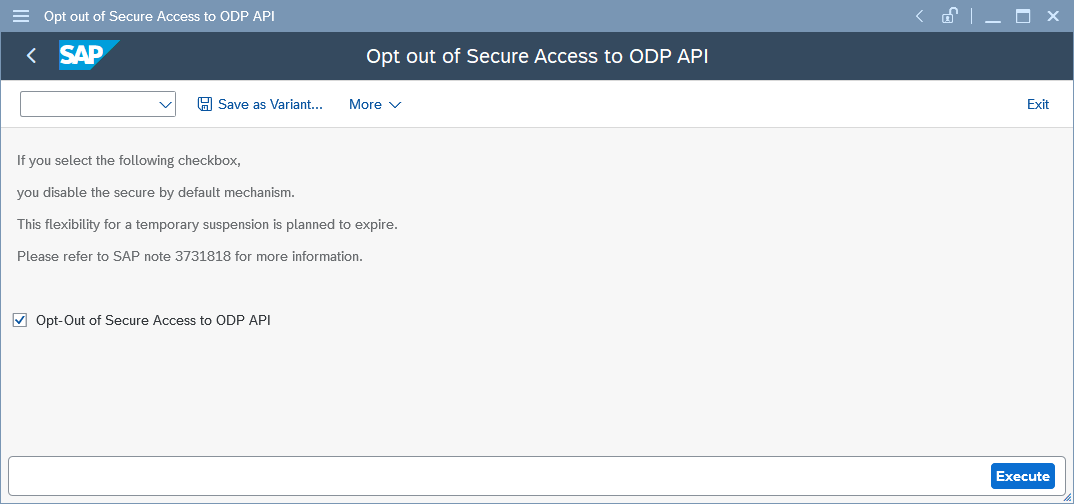
- Click [Execute].
SAP runs the report and applies the opt-out. ODP extractions run without disruptions by the security update.
Related Links
Last update: June 16, 2026
Written by: Valerie Schipka