Initial Table Load in SAP Versions < 7.10
The following article shows how to handle the initial table load for delta extractions using the Table CDC extraction type. The article applies in the following situation:
- Table CDC extractions run on SAP releases < 7.10
- The option Extract full table on first run (delta initialization) is activated.
- The delta initialization takes longer than the maximum processing time specified in the SAP profile parameter rdisp/max_wprun_time.
- The extraction aborts with an error message, e.g.,
ERPConnect.ABAPRuntimeException: RfcInvoke failed(RFC_ABAP_RUNTIME_FAILURE): TIME_OUT - Time limit exceeded.
Note
The custom function module /THEO/READ_TABLE used by the Table CDC component to extract the table does not support background mode on SAP releases < 7.10. The background mode avoids the timeout mentioned above.
Recommended Workflow
To do the initial table load and prepare delta updates:
- Create a new Table CDCextraction. Make sure the option Extract full table on first run is deactivated.
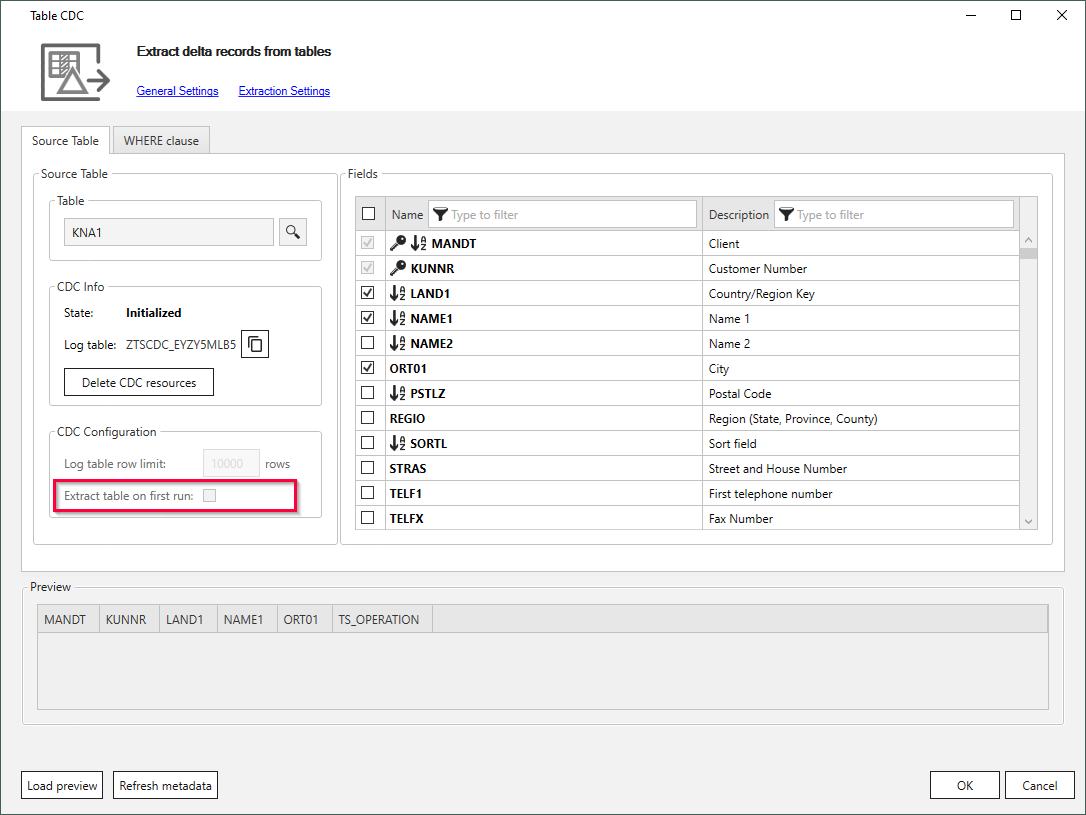
- Run the Table CDC extraction to initialize delta extractions. This ensures that no data is missed between table extraction and delta initialization.
- Create a new Table extraction.
- Select an SAP standard function module for the extraction, e.g., RFC_READ_TABLE.
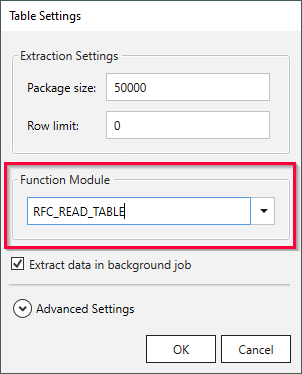
- Run the Table extraction.
The initial load of the table is completed without timeouts.
Related Topics
- Documentation: Define the TableCDC Extraction Type.
- Documentation: Define the Table Extraction Type.
- Documentation: Table Extraction Settings - Function modules and Background Jobs
Last update: June 28, 2025